Badges
Badges are a good way of celebrating achievement and showing progress. Badges may be awarded based on a variety of chosen criteria and are fully compatible with Mozilla Open Badges. Badges created in Moodle may be displayed on a user’s profile or pushed to their Open Badges backpack and public badge collections in their backpack will display in their Moodle profile.
There are two categories of badges:
- Site badges - available to users site-wide and related to the site wide activities, like finishing a set of courses.
- Course badges - available to users enrolled in the course and related to the activities that happen inside the course.
Badges Settings
Site administration settings
Badges are enabled by default and can be disabled in Administration > Site administration > Advanced features.
The site settings for badges are located in Administration > Site administration > Badges > Badges settings .
- Default badge issuer - Here you set the name and email address of the issuer. The name will appear where the badges are displayed and might typically be the name of the organization.
- Salt for hashing recipient’s email address - If a hash is used (numbers and letters only) then backpack services can confirm a badge earner without exposing their email address.
- Enable connection to external backpacks - This should be enabled in order to connect to, for example Mozilla Open Badges. Note that this will not work on a Moodle hosted locally/offline.
- Enable course badges - Ticking this box will allow teachers to add and manage badges in their courses.
Course administration settings
- A teacher can add and manage badges in their course if the administrator has enabled course badges in Administration > Site administration > Badges settings.
- They will see a link to badges in Administration > Course administration > Badges. where badges may be managed and added.
Individual user settings
- A user can manage badges from Navigation > My profile > My badges.
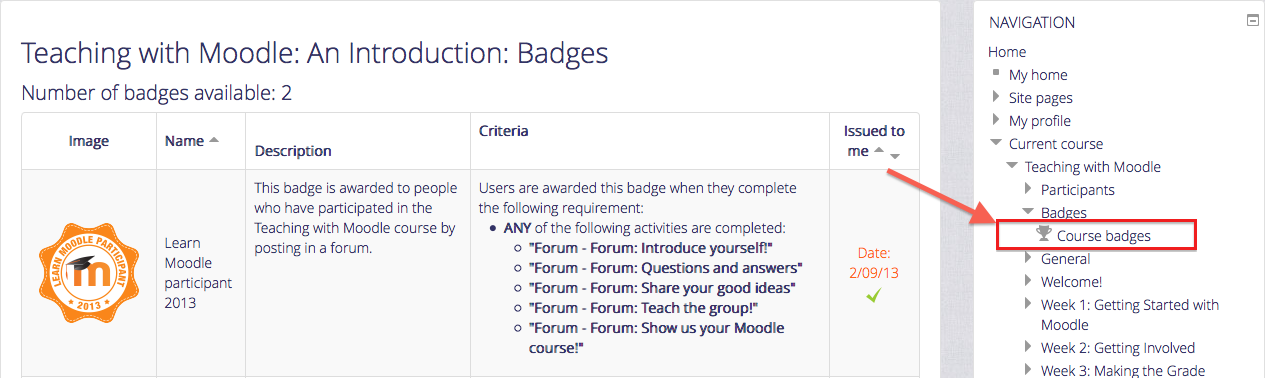
- A user can view available course badges from Navigation > Current course > Badges.
Manage Badges
Badges may be managed at the course or site level. (Note that teachers in a course cannot by default access site badges unless they have been given a system role with badge managing capabilities). Individual users can manage their badges from their profile.
See Managing Badges for more details.
Add a New Badge
To know how to add badges please refer Using Badges .